SNRN Signal Instructions
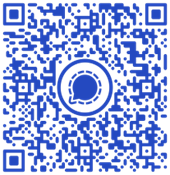
If you do not already have a Signal account, please follow the steps below and then scan the QR code to join the ISEE SNRN RRI Signal channel.
On Android (Phone or Tablet)
- Open the Google Play Store.
- Search for “Signal Private Messenger.”
- Tap Install.
- Once installed, open Signal.
- Enter your phone number and follow the verification steps.
On iPhone (iOS)
- Open the App Store.
- Search for “Signal Private Messenger.”
- Tap Get (you may need Face ID, Touch ID, or your Apple ID password).
- Open Signal after installation.
- Enter your phone number and complete verification.
On Computer (Windows, macOS, Linux)
- Signal Desktop works by linking to your phone.
- On your computer, go to Signal’s official website and download Signal Desktop for your operating system.
- Install and open the app.
- On your phone, open Signal. Go to Settings > Linked Devices > Link New Device.
- Scan the QR code shown on your computer.
ISEE SNRN RRI Signal Channel